Word Workout
Practice one word, your own phrase, or all Level basics. Uyen asks many different questions, and you answer each one with a sentence that uses your word.
In a Word Workout, Uyen asks one question at a time. You answer with a sentence that uses your word or phrase. Do not say the word alone: «Adiós» is not an answer, but «Adiós, hasta mañana» is. Each question is different: a new place, a new person, or a new time. Uyen does not say your word in the question.
Start a Word Workout
- One word: tap an underlined word in Practice or Recent practices, or tap a word on Words. Then select Word Workout.
- All Level basics: open Words. Under Level basics, select Workout all. Uyen uses all the basics that you did not ignore, in a random order, like a quiz. Each word gets one question before a word comes again, and each round has a new order.
- A word or phrase you type: open Words. Under Level basics, select Custom workout. Type the word or phrase, then select Start.
Uyen opens Practice with a new talk. Tap the orb to start. Uyen speaks first and asks the first question. You do not need to say anything first.
To start the same workout again, tap New on Practice. Uyen keeps the same words, starts a new talk, and your score starts again at zero. For Level basics, the words come in a new order.
How many questions
Some words and phrases have only a few natural uses. Uyen can only ask a question whose honest answer uses your word or phrase. It will not invent a forced question.
- A single short word usually has many questions.
- A longer phrase or sentence has fewer questions.
- For a word or phrase that you type, when Uyen has no new question, it tells you and ends the talk. For one word from the menu and for Level basics, Uyen keeps asking, and some situations can come again.
How Uyen asks
Your difficulty sets the size of the answer:
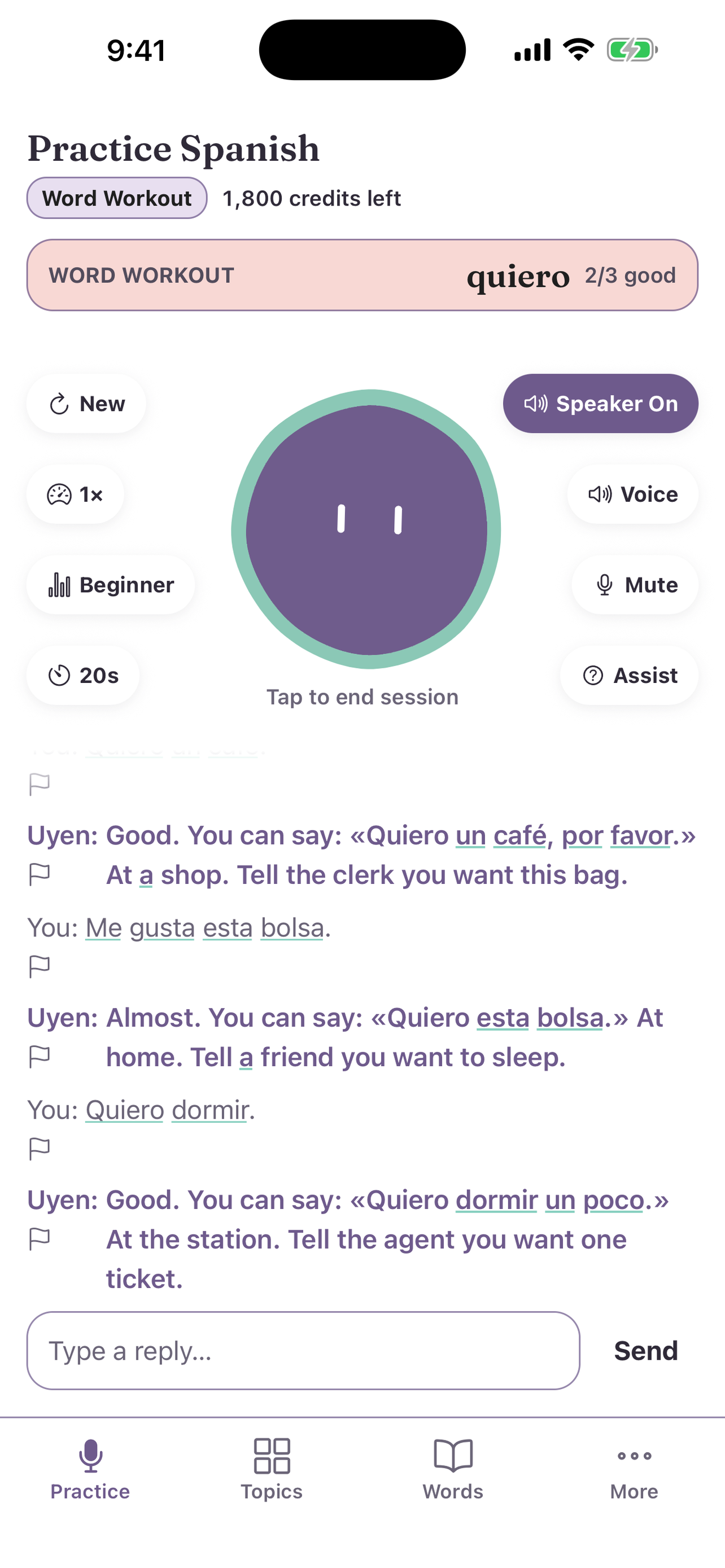
- Beginner: Uyen tells you a short scene in your Current language, for example "At a café. Tell the waiter you want a coffee." Answer with a short, simple sentence: «Quiero un café, por favor».
- Intermediate: Uyen asks in the language you practice. Answer with one short sentence.
- Advanced: Uyen asks in the language you practice. Answer with a full sentence that has more detail.
Some questions are about the word itself, not a scene. For example, Uyen asks what kind of word it is (a greeting, a verb, a noun), what it means, or when people say it. Uyen still does not say your word. Answer with a sentence that uses it: «Adiós es una despedida» or «Digo adiós cuando me voy».
At every level, say the word or phrase in the exact form that you practice. For example, a workout for «quiero» asks for «quiero», not «quiere» or «quería». To practice another form, start a workout for that form. A typed answer must use the exact form. A spoken answer can have a different ending, because speech-to-text often gets endings wrong.
To change the difficulty, see Adjust speed, difficulty, and wait. You can change it during a workout. Uyen uses the new level from the next question.
Your score
After each answer, Uyen says if it was good and gives you a correct way to say it. Then Uyen asks the next question.
If you say only the word, Uyen asks you to use it in a sentence, and the question counts as a miss. A phrase of three or more words that you type is already a sentence, so you can say it exactly.
Each answer must be new. If you say the same sentence again, or add only a small word such as «Hola», it counts as a miss. For «me llamo», Uyen does not ask for your name every time. It can ask you to check in at a hotel, to play a character with a different name, or to say where you are from.
The box at the top of Practice shows the word for the open question. After your first answer, it also shows your score for that word, for example 2/3 good. With more than one word, the box also shows where you are, for example 3 of 10.
- One word: Uyen asks about that word until you end the talk.
- More than one word: Uyen asks about each word one time, in list order. After the last word, Uyen starts again at the first word. Each word gets the same number of questions.
- No answer: in a voice talk, if you do not answer before the follow-up wait ends, Uyen goes to the next word. When Uyen's voice is off, Uyen waits for your typed answer. That question counts as a miss. See Follow-up wait.
- Stuck: tap Assist, ask for help, or say that you do not know. Uyen says the same question more simply and gives you an example sentence. That question does not count. At Beginner, the help is in your Current language, like the questions. Only the example is in the language you practice.
When a workout ends
- One word and Level basics: end the talk when you want.
- A word or phrase you type: a long phrase can have only a few good questions. When Uyen has no new question, it tells you. Then the talk ends, and Practice shows No more questions for this phrase.