Track your words
Look up words, mark them known or for more practice, and see your progress on the Words tab.
Uyen follows the words you use on your own. The Words tab shows what you know and what needs more practice.
Mark a word in the chat
- Tap an underlined word in Practice or Recent practices.
- Select an action:
- Look up: see the meaning in your Current language.
- Mark known: you know this word.
- Needs more use: Uyen brings this word back in your practice.
- Ignore: hide this word. See Ignored words.
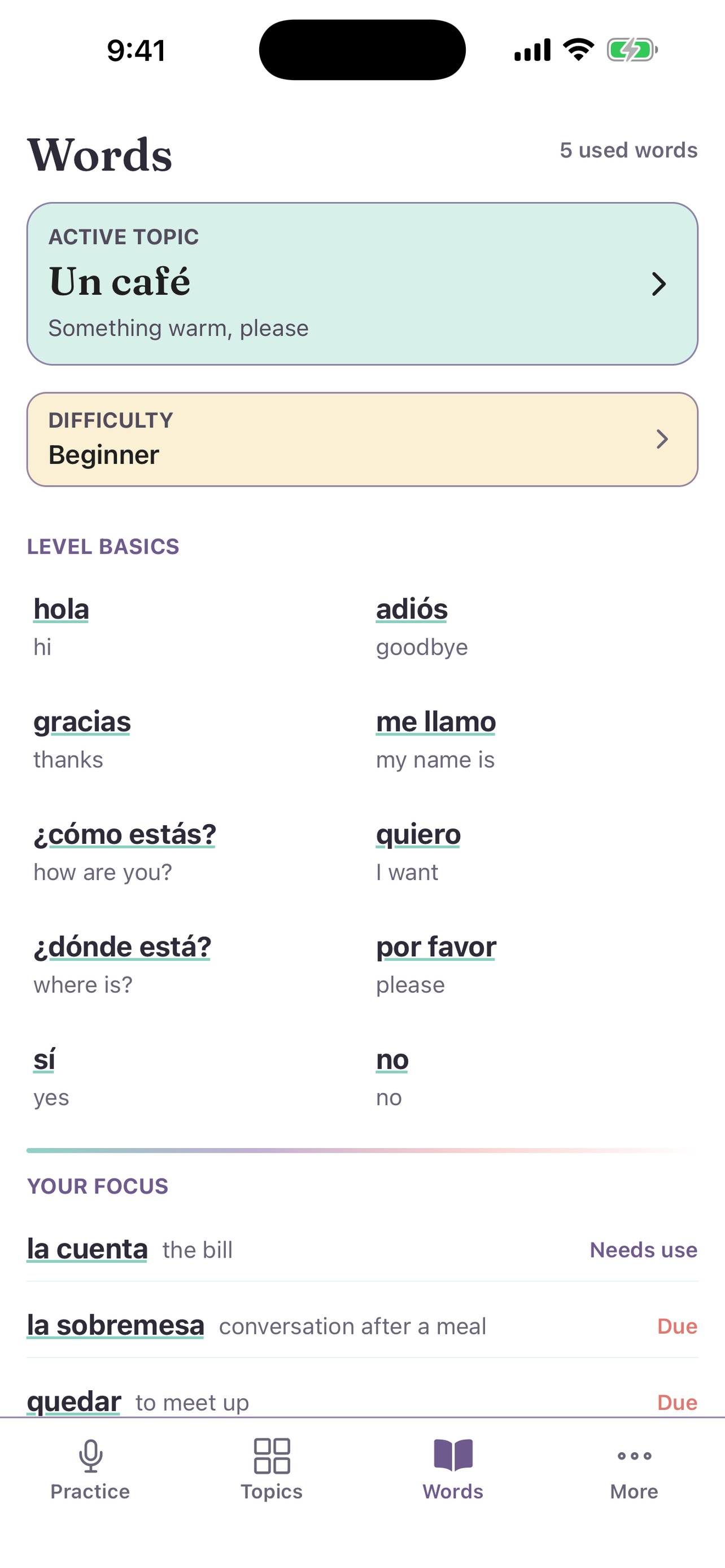
The Words tab
- Active topic: select it to change the topic.
- Difficulty: change the level.
- Level basics: the basic words and phrases for your difficulty. Tap one for the same actions.
- Your focus: words marked Needs use and words that are Due.
- Used vocabulary: all the words you used. Use Search word or meaning… to find one.
Word status
Tap the ? icon to see what each status means:
- New: you have not used this word on your own yet.
- Fragile: you used it on your own once.
- Growing: you used it on your own on two different days.
- Steady: you used it on your own for a week, in more than one situation.
- Needs use: you marked this word for more practice.
- Due: it is time to use this word again.
- Known: you marked this word as known.