Minutes and plans
How conversation minutes work, how to add time, and what Student and Professional include.
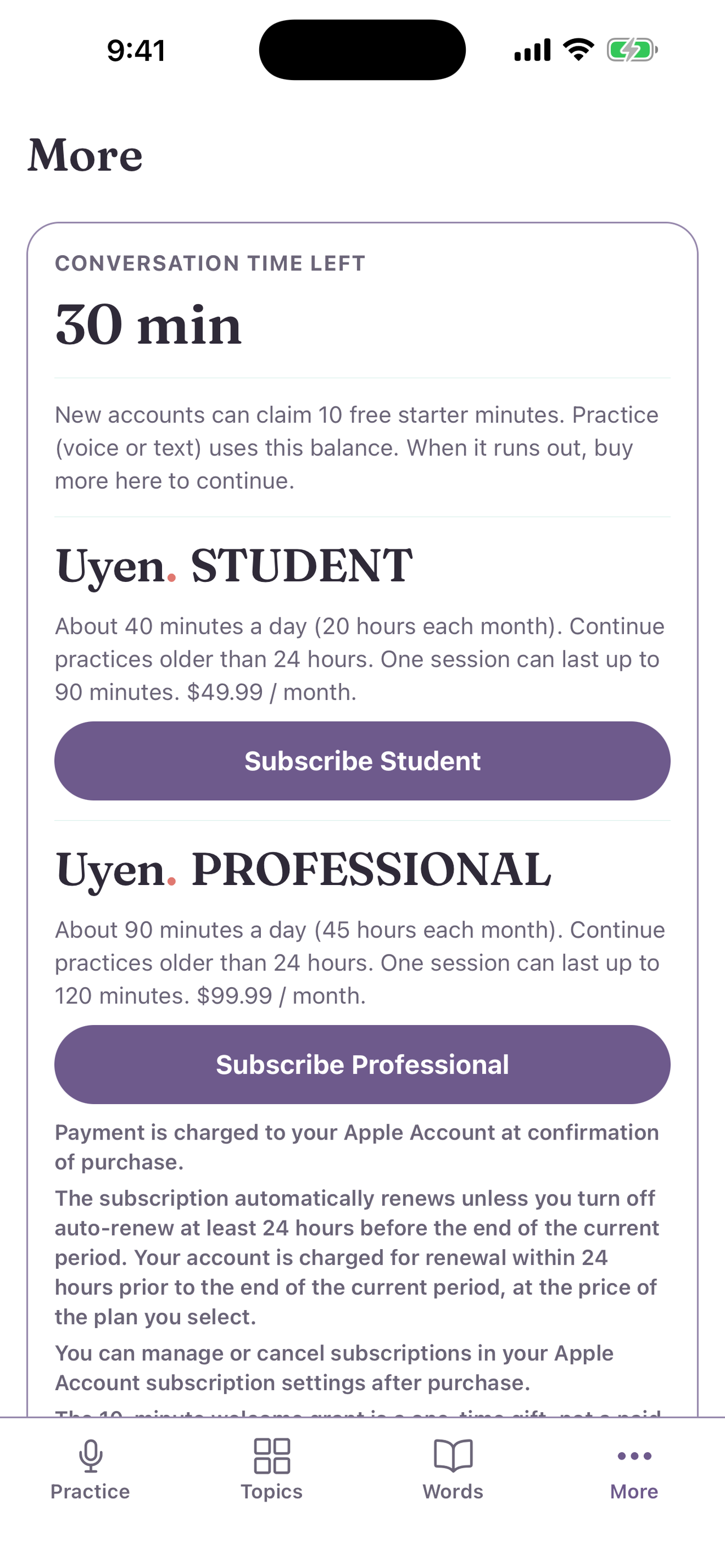
Practice uses conversation minutes. You see your balance under Conversation Time Left at the bottom of More.
How minutes work
- New accounts get 10 free minutes one time.
- Practice uses connected call time. The clock stops when you stop the call.
- Translations and word lookups use about one second each.
- Topic search uses a small part of your minutes.
Add time
Under Add time, select a pack of minutes. The store shows the price before you pay.
Plans
| Plan | Minutes | Longest session | |------|---------|-----------------| | Student | About 40 minutes a day (20 hours each month) | 90 minutes | | Professional | About 90 minutes a day (45 hours each month) | 120 minutes |
Both plans let you continue practices that are older than 24 hours. Select Subscribe Student or Subscribe Professional. The price shows in the app.
Restore or redeem
- Restore purchases: get your plan back on a new phone.
- Redeem code: enter a code, then select Apply.
Refunds
A refund is possible within 24 hours of a charge. A refund removes the minutes of that period. On iPhone, select Request refund when it shows.